
Free tool · No account
Free online metronome with timing feedback
Play any notes on the clicks. See right away if you are early, on the beat or late.
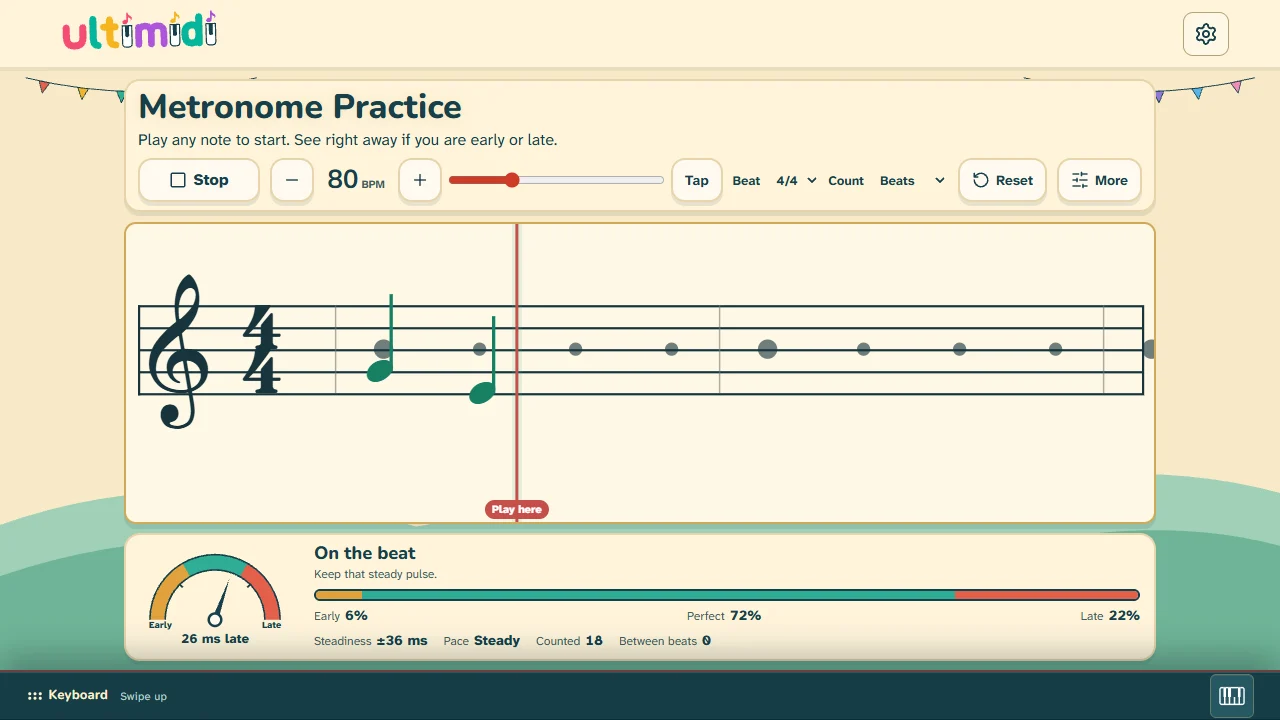
How it works
- Choose a tempo and a beat. You can change them at any time, even while the clicks run.
- Press Start or play any note. One bar counts you in.
- Play any notes: one key, a scale or your piece. Pitch is not judged.
- Watch the staff and the dial. Each note stays where it landed, so the gap from its beat dot is your timing error.
What the numbers mean
- Early, Perfect, Late
- The share of your counted notes. Perfect means within 40 ms of the click. You can choose Relaxed (70 ms) or Strict (25 ms).
- Dial
- The average of your last 16 counted notes: left is early, right is late.
- Steadiness
- How much your timing varies from note to note. A smaller number is steadier.
- Pace
- Whether your recent notes are speeding up or slowing down against the click.
- Between beats
- Notes away from the beats, such as faster rhythms. They stay out of the percentages. Choose Eighths if you play eighth notes.
What you can play with
- Screen piano or computer keys
- Work in the browser with nothing to connect.
- MIDI keyboard
- Needs a browser with Web MIDI, such as Chrome or Edge. Safari and iPhone or iPad browsers do not support it.
- Microphone (Beta)
- Listens for an acoustic piano after you allow it. We have not tested its timing on every piano and room, so treat its numbers as a rough guide.
Questions
Is it really free?
Yes. There is no account, no payment and no time limit. A run earns no game rewards and is not saved to an account.
Can I practice a real piece?
Yes. A beat with no new note does not count against you, so long notes and rests are fine. Choose Eighths if your piece has eighth notes.
Why does it say I am late when I feel on time?
Some speakers and headphones delay the click, especially over Bluetooth, and a browser can only estimate that delay. Try wired audio first. If the click still feels out of sync, open More and use Align my ears. It also removes your own habit of playing early or late, so use it only for a real delay.
Does it keep my results?
It remembers your tempo and settings on this device. Your results stay until you reset or leave the page.
How should I practice tempo?
Read how to practice piano with a metronome for a step-by-step method and what to do about each result.
Want to learn songs like a game? Play a free song or see all songs.